> For the complete documentation index, see [llms.txt](https://docs.sol-incinerator.com/llms.txt). Markdown versions of documentation pages are available by appending `.md` to page URLs; this page is available as [Markdown](https://docs.sol-incinerator.com/tool-guide/stuck-tokens.md).
# Stuck Tokens
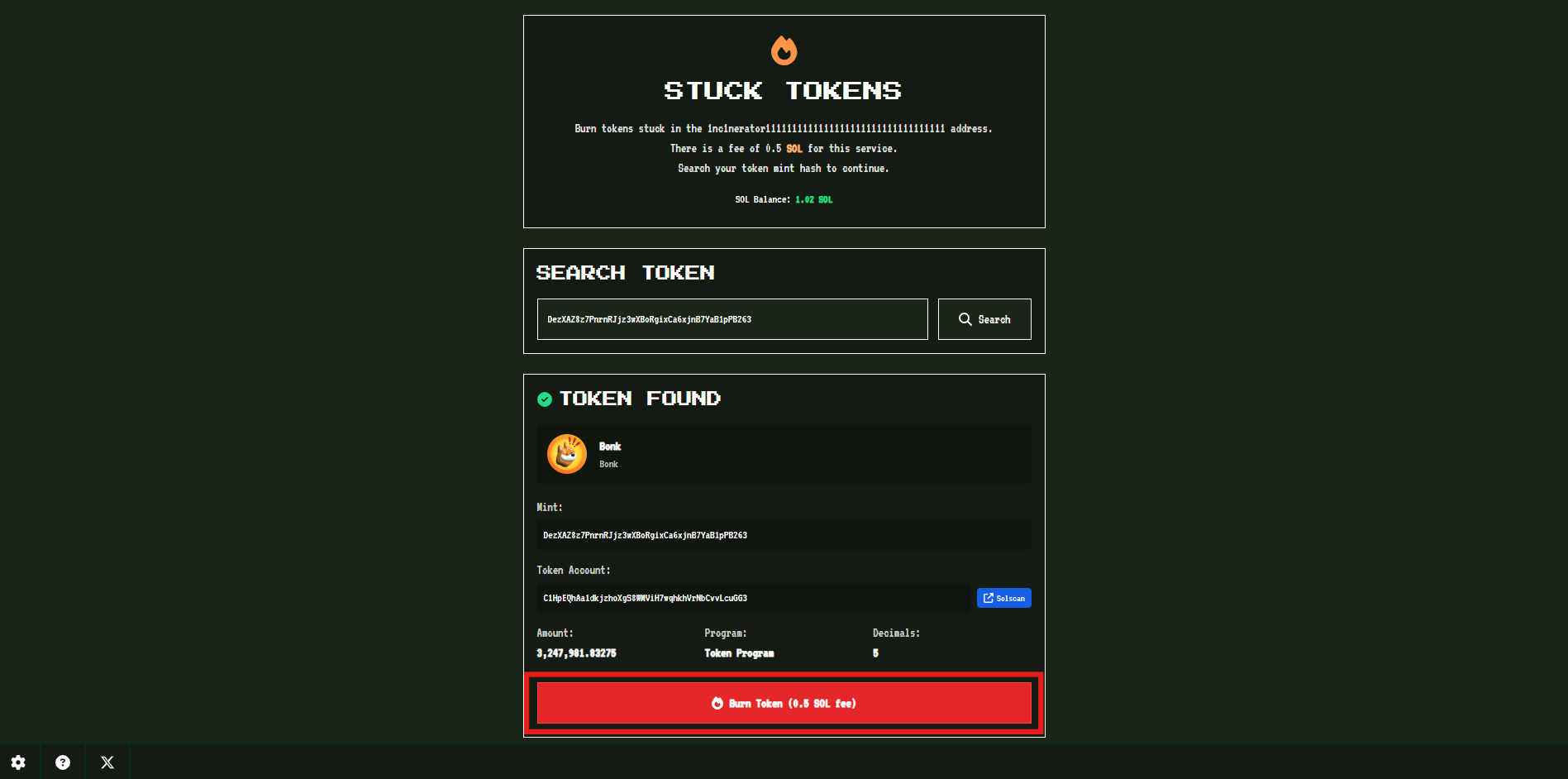
How to burn tokens stuck in the 1nc1nerator11111111111111111111111111111111 address.
## Stuck Tokens FAQ
What are "stuck tokens"?
Stuck tokens are tokens that were **accidentally sent to Solana’s burn (dead) address**\
`1nc1nerator11111111111111111111111111111111` instead of being burned using a proper burn instruction.\
\
Because this address has **no private key**, tokens sent there cannot be transferred, recovered, or interacted with through normal wallet tools.
Why didn’t my token burn when I sent it to the 1nc1nerator address?
Sending a token to the 1nc1nerator address **does not execute a burn instruction**.
On Solana, a true burn requires calling the SPL Token program’s burn method. Sending a token to the dead address only moves it to an inaccessible account—it does **not** reduce total supply or properly finalize the burn.
Is this address owned by Sol-Incinerator?
`1nc1nerator11111111111111111111111111111111` is a **canonical Solana burn/dead address** used across the ecosystem. It is **not owned, controlled, or operated** by the Sol-Incinerator project or any other application.
What does the Stuck Tokens tool do?
The Stuck Tokens tool:
* Detects tokens that were mistakenly sent to the Solana burn address
* Properly burns the token using the correct on-chain burn instruction
* Provides verifiable confirmation via Solana Explorer
Can I recover or sell a stuck token?
No.
Tokens sent to the burn address **cannot be recovered, transferred, or sold**. The only possible action is to **properly burn them**, which is what this tool enables.
Is there a fee to burn stuck tokens?
**Yes.**
Burning a stuck token incurs a **fixed 0.5 SOL service fee**, independent of token type or value. This fee is shown before confirmation.
When should I use this tool?
Use the Stuck Tokens tool if:
* You manually sent a token to the 1nc1nerator address
* The token still appears on-chain but cannot be moved or closed
* You intended to burn the token and want to properly finalize it
## How to Burn Stuck Tokens
***
{% stepper %}
{% step %}
### Connect Wallet
See [Connecting Your Wallet](/tool-guide/connecting-your-wallet.md) for instructions.
{% endstep %}
{% step %}
### Search Token
Enter the mint address of the token that was mistakenly sent to the Solana burn address (`1nc1nerator11111111111111111111111111111111`).
{% endstep %}
{% step %}
### Token Found
Once the token has been found, click the **Burn Token** button to proceed.
{% hint style="warning" %}
Verify this is the correct token before proceeding. Burning a token is irreversible and incurs a 0.5 SOL fee.
{% endhint %}
{% endstep %}
{% step %}
### Sign Transaction
Sign and confirm your transaction by clicking **Confirm**.
{% endstep %}
{% step %}
### Burn Successful
**Success!** The stuck tokens have been burned and your transaction is complete.
{% endstep %}
{% endstepper %}
---
# Agent Instructions
This documentation is published with GitBook. GitBook is the documentation platform designed so that both humans and AI agents can read, navigate, and reason over technical content effectively. Learn more at gitbook.com.
## Querying This Documentation
If you need additional information that is not directly available in this page, you can query the documentation dynamically by asking a question.
Perform an HTTP GET request on the current page URL with the `ask` query parameter, and the optional `goal` query parameter:
```
GET https://docs.sol-incinerator.com/tool-guide/stuck-tokens.md?ask=&goal=
```
`ask` is the immediate question: it should be specific, self-contained, and written in natural language.
`goal` is optional and describes the broader end goal you are ultimately trying to accomplish on behalf of the user. GitBook uses it to tailor the answer towards what is most useful for that goal.
The response will contain a direct answer to the question and relevant excerpts and sources from the documentation.
Use this mechanism when the answer is not explicitly present in the current page, you need clarification or additional context, or you want to retrieve related documentation sections.